About Imagen Palabra
See the picture, find the word — Imagen Palabra is a picture-and-word guessing game that turns a simple image into a satisfying little vocabulary puzzle. Study the clue, sift the jumbled letters, and spell out the answer. It is a free word game you can open in a click, and it gives your vocabulary and pattern-spotting a gentle, moreish workout.
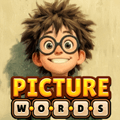
The board runs as an HTML5 game, so the images and letter tiles render in your browser tab on desktop or mobile — no download and nothing to install.
What is Imagen Palabra?
It is a picture-to-word puzzle. Each level shows you an image — or in some versions several images that share a theme — and a scrambled set of letters. Your job is to work out the word the picture represents and spell it by selecting the right letters in order. Guess correctly and you advance to the next image; the word usually matches the number of empty slots shown, giving you a length clue to work from. That neat loop of read-the-image, find-the-word is the whole appeal of this browser game.
What lifts it above simple guessing is the interplay of picture and letters. The image narrows the meaning, and the available letters narrow the spelling, so the two clues together often reveal an answer neither would alone. In most versions a hint can reveal a letter or remove wrong ones when you stall, but leaning on hints early spends a resource you may want for a truly tricky image.
Where to play
You can play this online game on desktop, laptop, tablet, or phone. On a computer you click letters to build the word; on touchscreens you tap them. Because it is a light HTML5 game, it loads instantly and stays smooth on any device, with no download before the first image.
How to play
Your goal is to identify the word each image represents and spell it from the letter tiles. You look at the picture, count the answer's empty slots for length, and tap letters in order to fill them. A wrong letter can usually be cleared and retried, and correct words unlock the next level. Some versions add a timer or a limited number of hints. There is no long tutorial — a level or two teaches the loop, exactly what a good free word game should do.
| Device | Build the word | Extra |
|---|---|---|
| Desktop / Laptop | Click letters in order to fill the slots | Click a placed letter to remove it |
| Mobile / Tablet | Tap letters to spell the answer | Tap a slot to clear it |
| All devices | The number of slots tells you the word's length | |
Scoring and progression
Solving quickly and without hints usually scores higher, and some builds reward a streak of correct answers. Early images are everyday objects with short words; later ones use trickier concepts, longer words, or themed sets that need a bit of lateral thinking. In most versions each correct answer unlocks the next image, steadily stretching your vocabulary as you climb.
Core mechanics
Read the length first. When an image stumps you, count the empty slots. Knowing the word is five letters instantly rules out longer or shorter guesses and focuses your search on the right candidates.
Scan the letters for anchors. When you have a rough idea of the word, look for its rare letters — a Q, X, or Z in the tray often confirms or rejects your guess before you place a single tile.
Think themes. When several images share a set, the theme narrows each answer. Spotting that a level is all animals or all kitchen items turns a blank image into a short list of likely words.
Use hints sparingly. When you are genuinely stuck and a hint can reveal a letter, spend it — but on the image you truly cannot crack, not the next easy one. A saved hint is worth most on the hardest level.
Tactics for a faster solve
Name the obvious first. Many images are direct — a picture of a key means "key." Trusting the plain, first-instinct reading before hunting for something clever solves the majority of levels in seconds and saves your thinking for the tricky ones.
Build from common letters. Start by placing the letters you are most confident about — a clear first letter or a distinctive ending. Anchoring part of the word narrows the rest, and the remaining tiles often fall into place around your certain letters.
Watch for word length traps. A picture of a "cat" might want "kitten" if the slots are longer. Always match your guess to the slot count rather than the first synonym that comes to mind, since the length is a hard constraint the image alone will not give you.
Sound it out. When a word is on the tip of your tongue, say the image aloud. Hearing it often surfaces the spelling, and matching those sounds to the available letters confirms whether you are on the right track.
Skip and return. If a level truly stalls and the version allows it, move on and come back. A fresh look at a stubborn image after a few easy wins often reveals the answer that would not come under pressure.
Features at a glance
- Picture-to-word puzzles that pair an image with a scrambled letter tray.
- Slot-length clues that narrow every answer to the right word length.
- Themed image sets in some versions that reward lateral thinking.
- Hints that reveal letters for genuinely tough images without solving them for you.
- Instant-start browser game with no download and no sign-up before the first image.
- A light HTML5 game that stays smooth on phones, tablets, and older laptops.
Similar games to try
Enjoy a quick brain challenge? These free browser games fit the mood:
| Game | Why try it |
|---|---|
| Memory Puzzle | A recall test for a different mental workout. |
| Daily Number Sums | Arithmetic logic when you want to swap words for numbers. |
| Picture Nonogram | Deduction that reveals a hidden picture. |
| Mob Control | A change of pace with aim-and-multiply crowd tactics. |
FAQ
Is Imagen Palabra free to play?
Yes. It is a free word game that runs in your browser. You can start the first image immediately with no download and no account. Everything you need — the pictures, the letter tray, and any hints — is available from the opening level onward.
Do I need to install anything?
No. It is an HTML5 game, so it loads inside your browser tab on desktop or mobile. There is nothing to download or update — open the page, let the image load, and start spelling. That makes it an easy pick for a quick brain break anywhere.
How do I solve a level?
Work out the word the image represents, then spell it by tapping the scrambled letters in order into the empty slots. The number of slots tells you the word's length, and correct answers unlock the next image to solve.
Can I play on mobile?
Yes. The browser game supports touch, so you tap letters to build each word. The layout scales to your screen, and because there is no download, a level on a phone starts as quickly as one on a desktop.
What if I cannot guess the word?
Use the length clue and any rare letters in the tray to narrow it down, and spend a hint on genuinely tough images if the version offers one. Skipping and returning with fresh eyes also helps a stubborn answer surface.
Does it get harder?
Yes. Later levels use trickier concepts, longer words, and themed sets that need more lateral thinking. The core loop never changes, which means the challenge comes from a broader vocabulary and sharper reading rather than new mechanics.
Final verdict
Imagen Palabra is a tidy, satisfying word puzzle that rewards a quick eye and a decent vocabulary. Its strengths are the clever pairing of image and letters, the clean slot-length clue, and that little spark of recognition when the word clicks. Its limits are the format's: it is calm and bite-sized by design, so it suits a short break more than a long session.
If you like word and picture puzzles, this browser game is an easy recommendation. Read the length first, trust the obvious answer, and build from your certain letters — do that and you will solve far more images than you get stuck on.
▶ Play Imagen Palabra free — no download, just look and spell
 +10
 +10
 +10
 +10
 +10
 +10
 +10
 +10
 +10
 +10
 +10
 +10